I just started setting up my Passport Prime, and I don’t want to use magic backups because I don’t have a google account linked to my phone. If there’s a way to store the master key backup somewhere else of my own choosing, that would be great, but I don’t see any option for that.
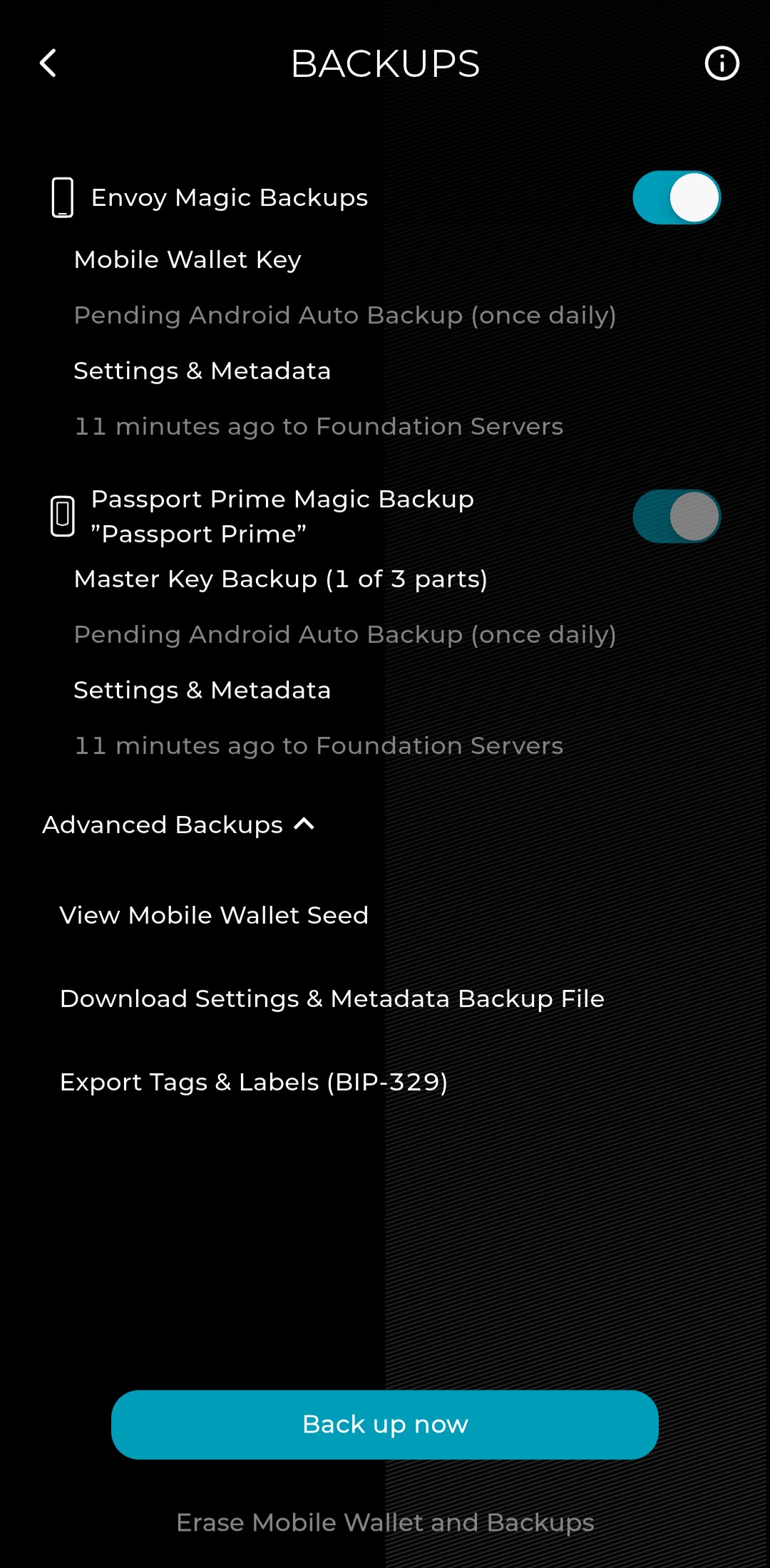
Anyway, when I try to turn off magic backups in Envoy, it’s impossible. I tried to turn off the boolean for “Envoy Magic Backups”, only to get a warning saying I must first disable the Passport Prime Magic Backups on device. I then go to the device, and the option to turn if off is greyed out there. Seriously, how do I turn this feature off?
Right now this is locked into a narrow band of functionality that essentially ties the MB status to whatever is set in Envoy. At this moment it would require a Prime erase, then for you to disable MB in Envoy and begin onboarding Prime again as a ‘manual’ user. During this process you could recover from the existing keycards and have the whole thing complete in <15 minutes, but if you don’t feel comfortable doing so, I’d advise you to wait for an update.
We’ve already started work to make it more independent in the next major KeyOS release v1.3.0, where you’ll be able to freely toggle either MB off independently.
Thanks. I’ll go ahead and wipe the device and start from scratch, since I haven’t done anything else with the wallet yet and I kind of prefer the manual backup method anyway.
In the future, do you think there’s any chance of magic backups using something else than automatic backup to a Google (or Apple) account? I’m doing everything I can to get AWAY from Google, so I’d prefer my privacy oriented devices to not be trying to integrate with Google services.
I think the ideal for me would be to still use 2 keycards, then the third part of the backup would be in an encrypted file that I could save wherever I choose. Or even better, I could choose which of the 3 parts would be on keycards vs backup files on my phone. Definitely a more hands on approach, but I think a lot of bitcoin people would like it that way.
I too did not want anything to do with Google. I would like to keep my GOS Pixel 10 google free. I kept Magic on, and moved the 3rd part to a usb drive.
That was obviously some confusion on my part. Each time I re-read your documents I seem to pick up some new nuance. I suppose I may have been confusing that with Prime there are 2 Magic backups, one for Envoy and one for Prime. So then is it fair to say that if you copy the file “envoy_backup.mla.txt” from Envoy and “settings.tar” from Prime and need to restore at some future time, these 2 files would be the equivalent to restoring from the 2 NFC cards or 1 NFC card and Envoy? (i.e. master seed, meta data, 2FA, keys, files, vault) If not, what am I missing?
I think between your response and description regarding Seedvault on GOS (link in chat above) and the last figure on the Magic description - Magic Backups: How Do They Work? - Foundation made me think I was moving the 3rd section of the Shamir, not the entire seed and backup. Either way I do move these backup files onto an external drive encrypted with bitlocker for now.
I upgraded from Passport, would it be possible to incorporate it into the backup/restore process?
One last unrelated point - in the description of how magic works it says - “Most users have iCloud Keychain or Android Auto-Backup enabled……..” Perhaps technically this is true, but I have hard time believing in circles of those most interested in maintaining as much privacy and sovereignty as possible and especially those going so far to self custody their own bitcoin would go to extreme measures NOT to auto-backup to google and have as little do with them as possible. One only has to look for interviews with Eric Schmidt when he was Chairman of Google on the issue of privacy, and most of those are 12 to 15 years ago, he certainly was not shy about it. And how many times have they changed their T&C since and not in favor of privacy. Apple is not much different. I would recommend someone from your team do an interview Naomi Brockwell of NBTV and the Ludlow Institute she has a large reach and you would have a very receptive audience for Prime. Thank you
I value my privacy and sovereignty and have no love for Google or any other tech giant but have no concerns at all since it is a free, convenient and reliable way to save the backup. Most problems are from people mishandling the seed phrase backup or other user error. This is a straightforward way to provide the majority of users a way to have a safe redundant backup.
There is no trust with Google or any cloud-based service, the trust is in the encryption just like with Bitcoin itself.
I agree with both of you except the part of being “Free". Google, like EVERY other company that portrays to offer something for free is NOT free. You are the product, so do not kid yourself they are doing something for the benefit of the folks that use their products. Whenever possible I opt out, and yes I pay for services and happily support those that respect my privacy. Yes @tomato I too wish there were other backup options.
You are of course correct they WANT us to be the product, but we don’t have to be to benefit from their free services. I use alternatives such as Proton mail, my own home server etc. also. My Google Cloud has nothing of value as far as I’m concerned. I encrypt everything I store there (as I do with my OneDrive, Koofr etc.) except for some memes and cat pictures.
Of course, more choices are always welcome and I’m sure they will come with time, but Google/Apple is the obvious choice for most users, the encryption makes Google’s or Apple’s intentions irrelevant.
When I set up Passport Prime using a previously installed and updated version of Envoy, it only backed up using three KeyCards without Magic Backup. So I deleted Envoy and reinstalled it, and then the setup completed with Magic Backup plus two KeyCards.