I’ve run into an issue with the 2FA app in passport prime. It appears that the Prime’s displayed 2FA codes have jumped ahead in time. A separate device displays codes that i have confirmed do work. Once those expire on that device, it then displays the set of codes that the Prime was showing just before that. So the prime codes do work, but only after the prime’s time has expired and is then displaying the next “future” code.
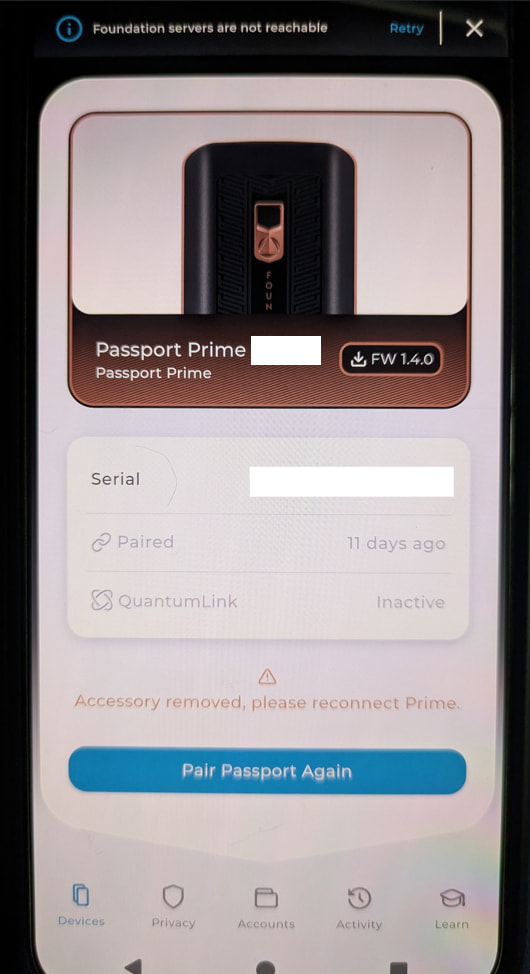
This error happens only after i opened Envoy after some time. Before opening Envoy the 2FA codes matched on separate devices. After opening Envoy i saw “Accessory removed, please reconnect Prime” And after that point the codes between devices did not match, and prime seemed to have jumped ahead.
I had seen this happen a couple weeks ago and I believe it does fix itself after reconnecting the prime. I wasn’t sure how to recreate the error, so I thought i would just wait and see if Envoy and Prime lost connection again after some time.
But why does the prime lose connection in the first place?
And why would a lost connection with envoy affect the codes in 2FA?
I haven’t reconnected it yet this time in case you need me to try something. Please advise
Hi Amaru, thanks for the detail.
Passport Prime keeps its own clock, and Envoy corrects it while the two are connected. Disconnected, the clock can drift, and 2FA codes change every 30 seconds, so a clock running a little fast shows the next code early. Reconnecting resets the time.
To find out why the connection dropped, please send these before you reconnect:
-
Passport Prime logs from Settings > Advanced > View Logs.
-
Envoy logs from Envoy > Settings > Advanced > View Envoy Logs.
-
A photo of the time on Passport Prime next to your phone’s clock.
-
Your Envoy version, phone model and OS version.
Then reconnect Passport Prime from the devices screen in Envoy.
Thanks
Thank you for the explanation, that makes sense. I didn’t notice that clock difference until now. Prime’s clock is about 37 seconds faster, currently. However what still confuses me is that Prime’s 2FA codes did not become unsynchronized until it tried to talk to Envoy again. This after a week or so just strictly operating as a lone 2FA device and not talking to Envoy.
Because i had seen this before i had confirmed that Prime was still in sync with my other 2FA device, and the codes did not jump ahead until I attempted to connect with Envoy again. I can’t comment on exactly when the clock itself changed because i did not observe that.
I will gather the information you listed later today. But I’m not sure if that’s good to post here? Should i send those logs more directly somehow?
That is useful clarification. The 37-second difference fully explains why Prime is displaying the next 2FA code early, but it does not tell us when the clock changed or whether the attempted Envoy connection caused it. I do not want to assume those events are connected without checking the logs.
Please do not post the logs publicly. Send them to hello@foundation.xyz with the subject “2FA clock issue – Amaru”, and include:
-
The Passport Prime and Envoy logs
-
The photo comparing both clocks
-
Your KeyOS and Envoy versions
-
Your phone model and OS version
-
A link to this forum thread
If possible, collect everything before reconnecting. Once captured, you can reconnect Prime to Envoy to correct the clock and restore the 2FA codes.
I sent all the information requested a few minutes ago, and received a reply from Hal the AI agent rather quickly. Only saying I should reconnect the devices.
A real human will be looking into all the contents of the email eventually correct? During office hours 
Yes, I’ll continue there.